
Prepare it. Play it. Put it on air.
The controls you need,
in one workspace.
01
Graphics that fit
your production.
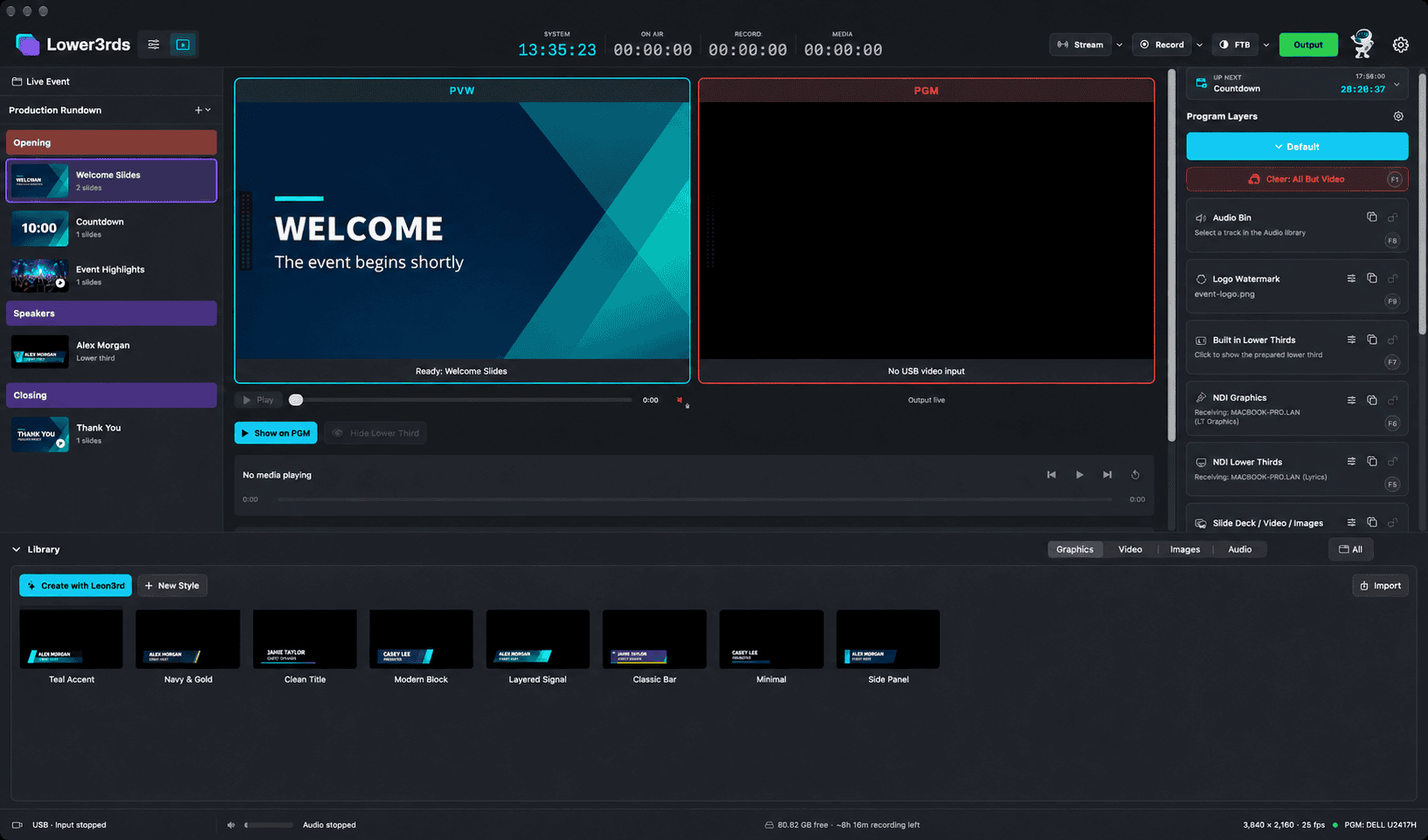
Create animated lower thirds with text, shapes, logos and images. Adjust fonts, colours and movement, or start with an AI-generated style.
02
A rundown you
can follow.
Arrange decks, videos and graphics in order. Set video in and out points, choose thumbnails, and attach Audio Bin tracks or playlists to decks.
03
Preview first.
Then take it live.
Prepare the next cue in PVW while PGM keeps playing. Use transitions, clear groups, fader locks and FTB to stay in control.
Build the picture in layers
Put every source
in its place.
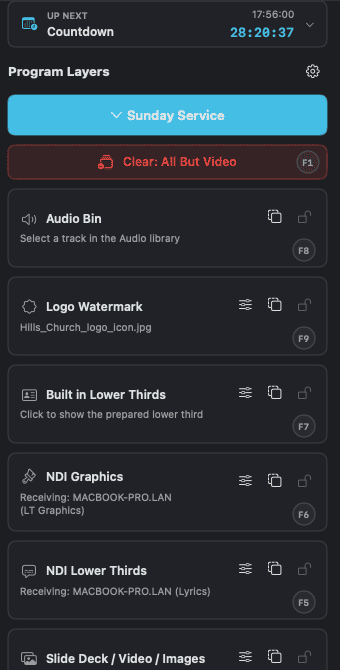
Bring in USB video, NDI sources, slide decks and graphics. Choose what sits on top, then save the order as a layer profile.
- Separate NDI Full Screen, Lower Thirds and Graphics inputs
- Crop, scale and position NDI overlays
- Recall layer profiles during a production
- Protect active layers with locks
- Trigger cues and profiles with RossTalk or the scheduler
Meet Leon3rd
Describe the style.
Make it yours.
Use the Leon3rd plugin in your supported desktop AI app to create lower thirds, build a rundown or update names and roles. Add screenshots for visual inspiration.
Review the proposal in Lower3rds, then apply it. Every generated graphic stays editable with the app’s own tools.
A starting point for your next graphic
“Create a navy-and-gold lower third. Bold name, smaller role. Slide in from the right and show our logo.”
Review the proposal. Adjust the details. Add it to your rundown.
Your finished program, wherever it needs to go
Record it. Stream it.
Or send it to your switcher.
Record and stream together.
Record the final PGM picture and audio while sending one stream to your destination.
- H.264 or H.265 recording
- YouTube, Facebook and custom RTMP/RTMPS destinations
- YouTube HLS connection option
- Quality controls, upload speed test and cache status
Work with your existing setup.
Use Lower3rds for graphics output or make it the final step in your production chain.
- Combined Program or separate key and fill displays
- NDI graphics and lyrics from compatible apps
- Incoming RossTalk Custom Controls
- Outgoing deck commands to multiple destinations
Before you download
Hardware
Apple Silicon Mac
M1 or newer
macOS
macOS 13 or later
Recording and streaming require macOS 14.2 or later.
NDI
NDI runtime
Install the official runtime to receive NDI sources.
Getting started
Guided tour + help
Searchable instructions and an illustrated manual in the app.