

Set the scene.
Bring on
the colour.
Bring LED strips into the show. Map a stage layout, build a cue list, and run colourful looks from one Mac. Designed for addressable LEDs connected to WLED controllers.
For Apple silicon Macs with macOS 14 or later. WLED controllers required.
Map the stage.
Build the show.
Start with the stage layout.
Arrange strips to match the physical stage. Assign their positions and pixel ranges to WLED controllers.
Give every moment a cue.
Combine generated looks, media and live NDI in a cue list. Move between lighting cues as the show unfolds.
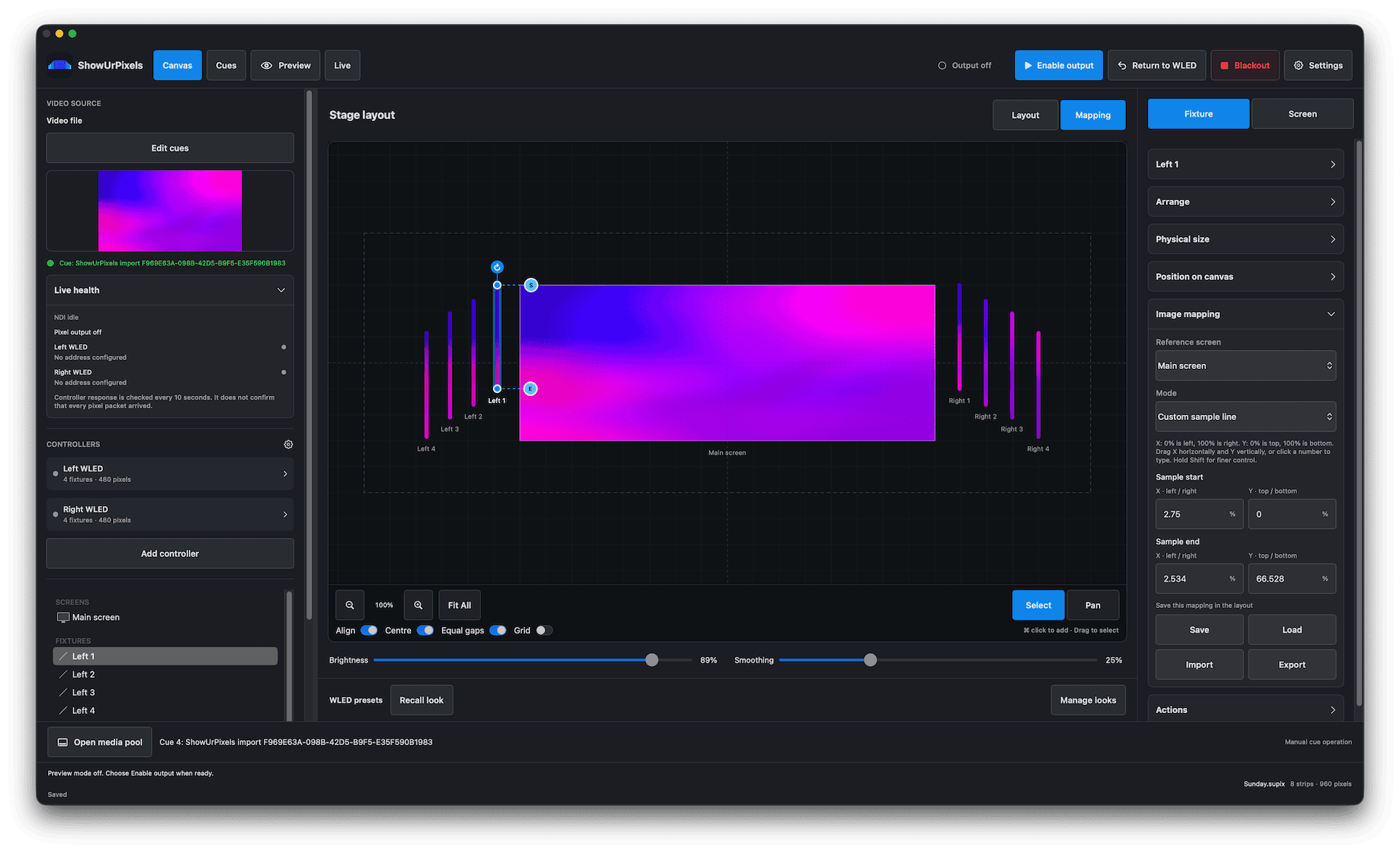
Map your pixels your way. Drag sample points to choose exactly which part of the screen feeds each fixture.
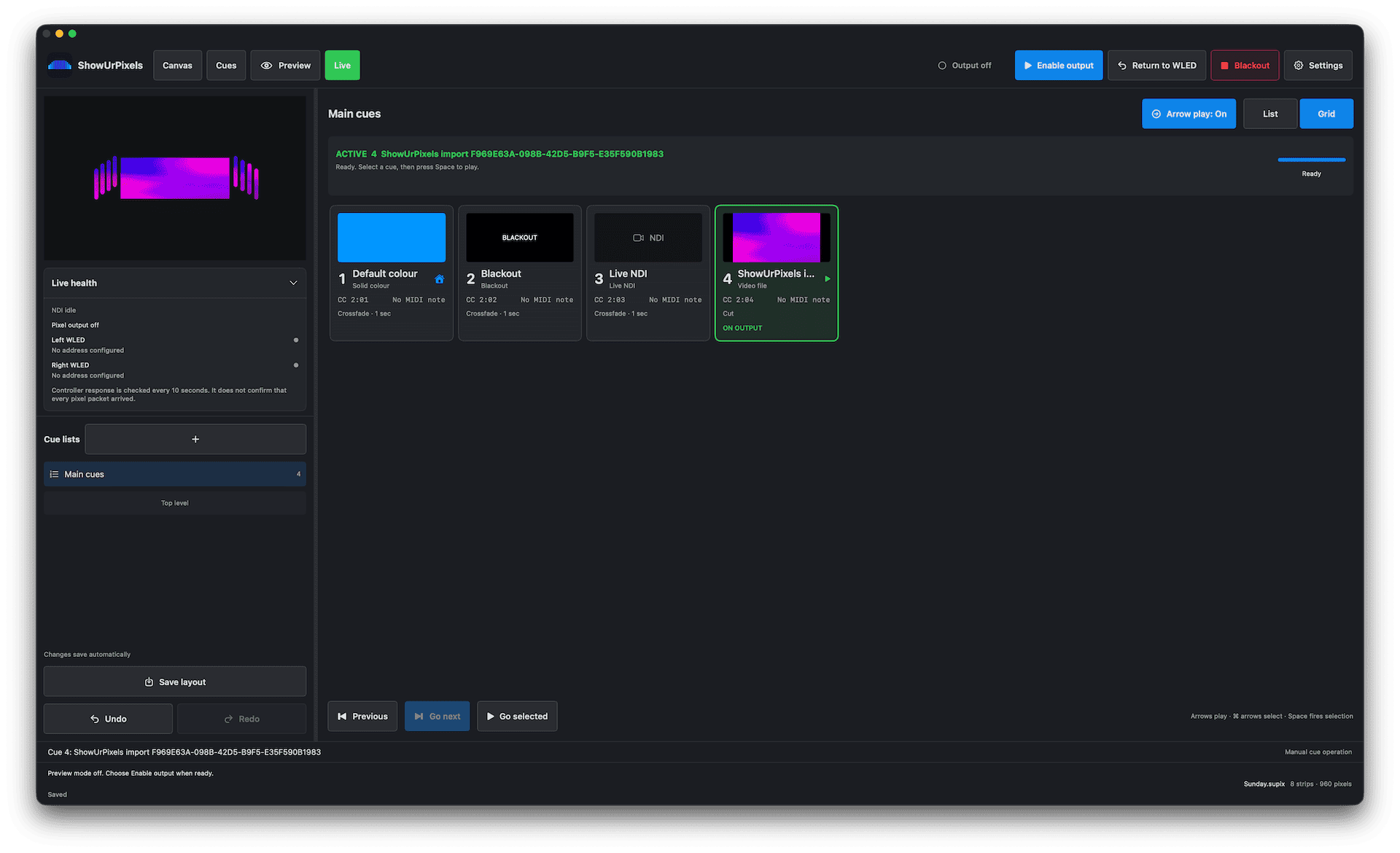
Run your show with flexible cues. Trigger media, colours and live NDI using your keyboard, MIDI or RossTalk.
From the first look to the final blackout.
Prepare the lighting in Setup. Run it from Live Mode. Keep the controls close when the room goes dark.
Colour, media and live NDI.
Build cues from solid colours, gradients, still images, video files or a live NDI feed. Start with a simple colour look, then add media when the moment calls for it.
Cuts when it counts. Fades when it flows.
Set a cut or crossfade for each cue, with fades from 0 to 60 seconds. Take another cue during a fade and the transition continues from the colours already on screen.
Keep cues within reach.
Run a cue list or a large button grid in Live Mode. Select a cue, fire it with Space, or use Next to follow the list. Cues advance when the operator takes them.
Connect the show controls.
Trigger cues with MIDI or incoming RossTalk Custom Controls. Assign direct cue triggers and use the RossTalk workflow to connect with ProPresenter.
More than straight lines.
Lay out strips, rectangles, circles, arcs, matrices and custom paths. Map colour from a screen edge, mirror the source, spread it across a wider canvas or save custom sample lines.
Keep the setup together.
Organise cues in lists and folders. Save layouts and app owned media in a show package, with automatic saving, undo and hourly backups to help manage changes.
What is WLED?
WLED is free, open source software that runs on compatible LED controllers. It controls addressable LEDs, so individual pixels can display different colours. Its browser interface provides settings, effects and saved presets.
ShowUrPixels runs on the Mac and sends pixel colours over the local network to controllers running WLED. WLED then drives the connected LEDs. Set up the controllers and LED wiring in WLED first, then use ShowUrPixels to map the stage and run cues.
WLED CONTROLLERReceives colours and drives the LEDs
ADDRESSABLE LEDSThe light on stage
What you need.
ShowUrPixels is the control software. A working WLED setup provides the connection to the LEDs.
Mac
macOS 14 Sonoma or later. The current release targets Apple silicon Macs.
WLED controllers, required
One or more compatible controllers running WLED, with DDP realtime receiving enabled. Tested with the GLEDOPTO Elite 4-Channel WLED Controller (ESP32, Ethernet).
Addressable LEDs
LED strips or fixtures supported by the chosen WLED controllers, with suitable power supplies and wiring.
Local network
The Mac must be able to reach each WLED controller on the local network. Wired Ethernet is recommended for show use.
Optional sources and triggers
Use a reachable NDI source for live video mapping. MIDI and RossTalk are optional. Generated cues and local media do not require an NDI source.
Before getting started.
Does ShowUrPixels work without WLED?
WLED is required for LED output. The local preview can run without connected hardware, but the app is designed to send pixel data to WLED controllers.
Are controllers and LEDs included?
No. ShowUrPixels is Mac software. Controllers, LEDs, power supplies and network equipment are separate.
Do I need ProPresenter or an LED screen?
No. Generated colours, gradients and local media can drive the strips without ProPresenter or a physical LED screen. Live NDI and remote triggers are optional.
Can it control an LED video wall?
ShowUrPixels maps colour onto addressable LEDs through WLED. It does not send a video feed to an LED wall. Keep the wall on its existing video system.
Can I use existing WLED presets?
Yes. Create named looks that recall existing presets across enabled controllers, even when preset numbers differ. Return to WLED restores the captured controller state.
What happens if a source drops out?
A missing or failed source switches to the configured fallback colour. Intentional blackout stays separate. Controller recovery after a network interruption depends on the WLED realtime timeout setting.
Bring the stage to life.
Map addressable LEDs, build show cues and control WLED from one Mac.
Requires macOS 14 or later, an Apple silicon Mac and WLED controllers. Hardware sold separately.